
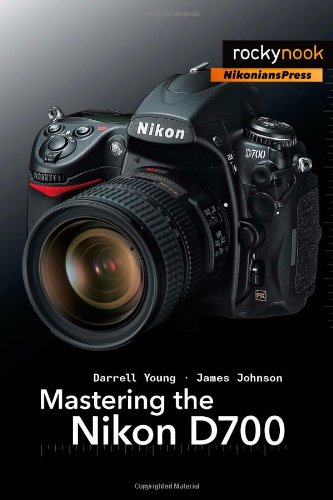
Mastering the Nikon D700 1st Edition by Darrell Young, James Johnson ISBN 978-1933952239 1933952237

Original price was: $50.00.$35.00Current price is: $35.00.
Mastering the Nikon D700 1st Edition by Darrell Young, James Johnson – Ebook PDF Instant Download/Delivery: 978-1933952239, 1933952237
Full download Mastering the Nikon D700 1st Edition after payment
Product details:
ISBN 10: 1933952237
ISBN 13: 978-1933952239
Author: Darrell Young, James Johnson
Mastering the Nikon D700 provides a wealth of information and professional insights for owners of this powerful new camera. Each chapter explores the features and capabilities of the D700 in detail, surpassing basic user manuals by providing step-by-step menu setting adjustments coupled with illustrations and logical explanations for each option. The authors’ writing style allows the reader to follow directions in a friendly and informative manner, as if a friend dropped in to share his experienced knowledge without “talking down” to you, explaining the how and the why.
The learning experience for D700 beginners (and refresher information for professionals) goes beyond the camera itself. When camera features and options expand to additional Nikon equipment (such as with the use of optional Speedlights) the authors add the necessary information. Their frequent references to user manuals provided by Nikon (complete with specific page references) allow the reader to easily navigate past the confusion factor that often comes with new equipment.
Mastering the Nikon D700 is another title in the Nikonians Press series-the exciting, new, joint venture between Nikonians and Rocky Nook.
Table of contents:
Chapter 1: Using the Nikon D700
1.1 Nikon D100 – Generation 1
1.2 Nikon D200 – Generation 2
1.3 Nikon D300 – Generation 3
1.4 Nikon D700 – Generation 4
1.5 EXPEED Image Processor
1.6 FX vs DX Image Sensor
1.7 12.1-Megapixel CMOS Sensor
1.8 Five or Eight Frames per Second
1.9 Noise Control
1.10 Live View
1.11 3-Inch Monitor
1.12 Fine-Tuning
1.13 Sensor Dust Cleaning
1.14 Picture Control
1.15 Active D-Lighting
1.16 51-Point Autofocus
1.17 12-Bit or 14-Bit Color Depth
1.18 Lossless Compressed NEF (RAW)
1.19 Exposure Delay Mode
1.20 Retouch Menu
1.21 My Menu
1.22 95% Viewfinder Frame
1.23 Rubber Covers Instead of Lost Screw-On Caps
1.24 HDMI Device Port
1.25 My Conclusions
Chapter 2: Exposure Metering, Exposure Modes, and Histogram
2.1 Metering Systems
2.2 3D Color Matrix II Meter
2.3 Fine-Tuning Matrix Metering
2.4 Using Flash with Matrix Metering
2.5 Center-Weighted Meter
2.6 Where’s the Circle?
2.7 What About the Averaging Meter?
2.8 Spot Meter
2.9 Exposure Modes
2.10 P – Programmed Auto Mode
2.11 Get Down, Grandpa!
2.12 S – Shutter Priority Auto Mode
2.13 A – Aperture Priority Auto Mode
2.14 Understanding Depth of Field
2.15 M – Manual Mode
2.16 Histogram
2.17 Understanding the Histogram
2.18 How Does the Eye React to Light Values?
2.19 Computer Adjustment of Images
2.20 My Conclusions
Chapter 3: Multi-CAM 3500FX Autofocus
3.1 What Is the Multi-CAM 3500FX Autofocus Module?
3.2 Understanding the Focus Modes, AF-Area Modes, and Release Modes
3.3 Focus Modes in Detail
3.4 AF-Area Modes in Detail
3.5 Release Modes in Detail
3.6 My Conclusions
Chapter 4: White Balance
4.1 How Does White Balance (WB) Work?
4.2 Color Temperature
4.3 Method 1 – Manual White Balance Using the WB Button
4.4 Method 2 – Manual White Balance Using the Monitor LCD’s Shooting Menu
4.5 White Balance Bracketing
4.6 AUTO White Balance
4.7 White Balance Tips and Tricks
4.8 My Conclusions
Chapter 5: Shooting Menu Banks
5.1 Setting Up Shooting Menu Bank A
5.2 Shooting Menu’s 20 Item Review
5.3 NEF (RAW) Format
5.4 TIFF Format
5.5 Combined NEF and JPEG Shooting
5.6 Notes on the Image Formats: RAW, TIFF, and JPEG
5.7 Picture Controls
5.8 My Conclusions
Chapter 6: Custom Setting Banks
6.1 Setting Up Custom Setting Bank A
6.2 Configuring the Custom Settings
6.3 Shooting/Display
6.4 How to Use the Auto Bracketing System
6.5 Controls
6.6 My Conclusions – Using the Shooting Banks and Custom Banks Together
Chapter 7: Playback Menu
7.1 Delete Function
7.2 Playback Folder
7.3 Hide Image
7.4 Display Mode
7.5 Image Review
7.6 After Delete
7.7 Rotate Tall
7.8 Slide Show
7.9 Print Set (DPOF)
7.10 My Conclusions
Chapter 8: Setup Menu, Retouch Menu, and My Menu
8.1 Section 1: Setup Menu
8.2 Section 2: Retouch Menu
8.3 Section 3: My Menu
8.4 My Conclusions
Chapter 9: Nikon Creative Lighting System
9.1 What Is the Nikon Creative Lighting System (CLS)?
9.2 How Does the D700 Fit into the CLS Scheme?
9.3 What Is Commander Mode and How Does it Work?
9.4 Using the Nikon D700 in Commander Mode
9.5 Nikon SB-600 Speedlight Slave Configuration
9.6 Using the Nikon SB-800 Speedlight as a Commander Device
9.7 Examining the Nikon SU-800 Wireless Speedlight Commander Unit
9.8 My Conclusions
People also search for:
darrell young mastering the nikon d850
mastering the nikon d750 pdf download
mastering the nikon d500
mastering the nikon z8
mastering the nikon d850 pdf
Tags: Darrell Young, James Johnson, Mastering the Nikon